


Omnipod 5
3.5990.00 Reviews
App Specs
- Version
- 4.0.2
- Updated On
- License
- Free
- Downloads
- 100,000+
- Developer
- Insulet Corporation
- Categories
- Medical
- Platform
- Android
Screenshots

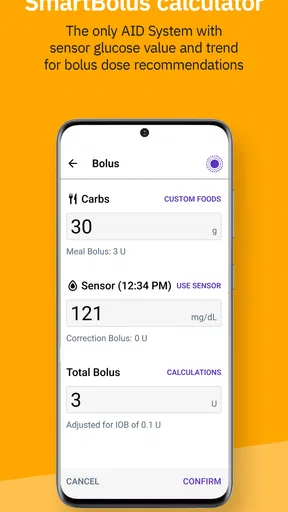
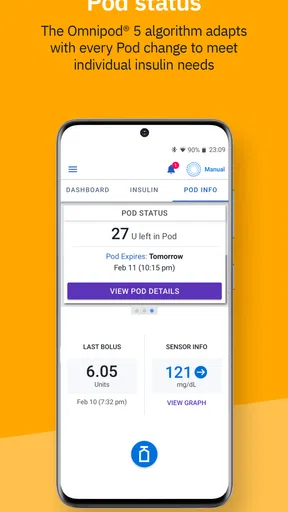
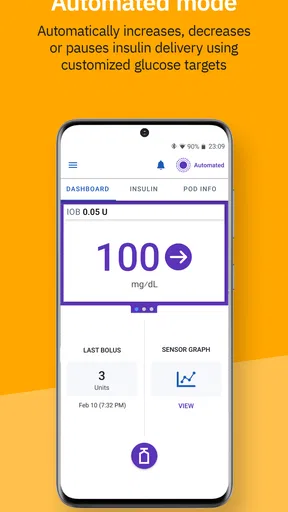
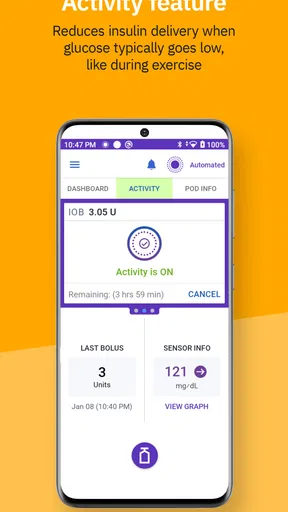

 Analysis by AppCompare
Living with diabetes often means making many small decisions throughout the day, so an app connected to insulin delivery has to do more than look modern during the first few days. My experience with Omnipod 5 is that its real test begins after the novelty wears off: can it fit into meals, work, travel, exercise, and the ordinary interruptions of life without becoming another source of mental load? As a medical app from Insulet Corporation, it is designed around the Omnipod 5 Automated Insulin Delivery System rather than acting as a general diabetes diary.
That distinction matters. This is not an app I would recommend casually to someone who simply wants to record glucose readings or count meals. Its value depends on whether you use the compatible Omnipod 5 system and whether its workflow suits the way you already manage insulin. For the right person, the app can become a practical control point. For someone outside that setup, it is not a replacement for a conventional glucose-tracking app, a standalone insulin calculator, or advice from a diabetes care team.
What the first week feels like
The first week is where the app makes its strongest impression. The appeal comes from having the Omnipod 5 system represented in a phone-based interface instead of treating insulin delivery as a completely separate task. I found that this can make the routine feel more connected: the phone becomes part of the daily workflow, while the pod remains the physical element doing its job.
That convenience is not the same as simplicity. A person still needs to understand the system, follow the instructions that come with it, and know what to do when a reading, pod, phone, or connection does not behave as expected. The app can make an established routine easier to access, but it does not remove the need for diabetes knowledge. I would treat the first days as a learning period, not as a time to make independent changes without guidance from a qualified healthcare professional.
One useful early habit is to decide where the app belongs in your day. If it is buried among rarely used apps, it becomes easy to overlook when you are rushing. I would place it somewhere visible, keep the phone charged, and build checks around moments that already happen, such as preparing a meal or getting ready to leave home. That sounds basic, but recurring medical technology succeeds through reliable habits more than through impressive menus.
The first-week experience can also reveal whether phone-based control is comfortable for you. Some people appreciate having a familiar screen nearby. Others may dislike depending on a phone for an important health routine, especially if they frequently change devices, silence notifications, run low on battery, or keep their phone away during work. That is an important personal trade-off, and no interface can solve it completely.
I would also avoid judging the system from a single unusually good or difficult day. Meals, exercise, stress, illness, and schedule changes can all affect glucose management. The more useful question is whether the app helps you follow your prescribed routine consistently and understand what is happening. If the first week feels confusing, that is a reason to slow down and seek instruction, not to improvise.
Worth Reading Before You Choose

EA SPORTS FC Mobile 26 Is a Bigger Football Game, but It Takes Time

Flipboard Shows What News Apps Must Do Beyond the Feed

Switching to Android Auto Means Rethinking Your Driving Routine

Google Calendar Makes a Crowded Week Easier to Manage

Ludo King Makes the Most of the Minutes Between Plans

Baby Panda World Brings Quick Play to Modern Phones, but Its Game Library Feels Busy
Who benefits most from the setup
The strongest fit is someone already using, or seriously considering, the Omnipod 5 system with support from a diabetes care team. The app makes the most sense when it is part of that complete ecosystem. It can be especially appealing to people who prefer managing technology from a phone and want their insulin-delivery routine to feel less fragmented.
It may also suit a busy parent or caregiver who needs a clear, repeatable process around meals and daily transitions. In a realistic morning scenario, a user might be preparing breakfast, checking the phone before leaving, and confirming that the day’s routine is organized rather than searching through separate tools. The benefit is not that the morning becomes effortless; it is that fewer disconnected steps compete for attention.
On the other hand, I would tell someone to pause before choosing it if they are looking only for a free medical app. Although the app itself is free and rated for Everyone, that does not make it a universal diabetes-management tool. Its usefulness is tied to the broader Omnipod 5 system, so a person using another insulin delivery method may find a general glucose log or the companion app for their existing device more appropriate.
Why it can still matter after the first month
After the initial excitement fades, the app’s value comes from repetition. A medical app earns a lasting place when it supports the same important actions on ordinary days, not just when a new device is being set up. Here, the recurring value is connected to having a consistent interface for the Omnipod 5 routine and keeping that routine close to a device many people already carry.
I like the idea of evaluating it by friction rather than novelty. Does it help you complete a familiar task without hunting for information? Does it fit naturally around meals, school, work, or sleep? Does it reduce the number of separate tools you need to remember? Those are more meaningful questions than whether the screens feel impressive on the first day.
A practical monthly workflow is to review how often the app interrupted your routine. If you repeatedly forgot to open it, struggled to keep the phone ready, or felt uncertain about what a message required, the problem may be the workflow rather than your motivation. Adjusting where the phone is kept, when you check it, and how you prepare for pod changes can make the system easier to live with. I would make one change at a time so you can tell what actually helps.
The app is also more valuable when it supports conversations with your healthcare team instead of replacing them. Bring recurring questions, unusual patterns, or moments of uncertainty to those appointments. The app can be part of the record of your routine, but medical decisions should remain grounded in professional advice and your complete health picture.
Its month-to-month usefulness is less convincing for people who want a broad health dashboard. If your priority is logging food, exercise, medication reminders, or several glucose sources in one place, a dedicated diabetes-management platform may offer a wider set of tools. Omnipod 5 is more focused. That focus is a strength when you want the Omnipod workflow, but a limitation when you want an all-purpose health journal.
Everyday situations that test its value
Travel is a good example. A user may need to think about phone charge, access to supplies, changes in routine, and what to do if the normal workflow is disrupted. The app does not eliminate that preparation. Its advantage is that the familiar control experience can travel with you, provided you plan responsibly and follow the instructions for your system.
Exercise creates a different test. The important issue is not whether an app can make activity predictable; no app can remove the body’s response to movement. The useful question is whether the system remains understandable when your schedule changes. I would prepare for exercise using the guidance from my care team, keep necessary supplies available, and avoid treating the app as permission to ignore warning signs.
Meals are where small habits become visible. A rushed lunch, an unfamiliar restaurant, or a late dinner can expose whether the workflow is genuinely manageable. My advice is to learn the normal process during calm meals first. Once that feels familiar, it is easier to handle unusual situations without making several new decisions at once.
Phone changes deserve attention too. Before replacing a device or resetting one, I would make sure I understand the correct transition process for the Omnipod 5 app and system. Medical apps are not the place for casual experimentation with a new phone, because access and compatibility can affect a time-sensitive routine. Checking the current instructions and asking the care team when unsure is the sensible approach.
The maintenance burden people notice later
The maintenance burden is not only tapping through the app. It includes keeping the phone available, staying familiar with the system, handling supplies, responding to alerts or prompts appropriately, and remembering that technology still needs a backup plan. That broader workload is easy to underestimate when a product is presented as a smoother alternative to manual tasks.
I found the recurring responsibility manageable when treated as a routine rather than something to think about only when a problem appears. A small preparation checklist can help: charge the phone, know where supplies are, understand the normal replacement process, and keep essential contact information accessible. These steps are not glamorous, but they protect the convenience the app is meant to provide.
Updates are another part of maintenance. The current version is 4.0.2, and the app supports Android 8.0 or later. Those details make it important to check the phone’s operating system and the app’s compatibility before relying on it. I would not assume that every phone behaves identically, particularly when a device is old, heavily customized, or shared with other demanding apps.
The app has passed the point of being a brand-new experiment, having been released on February 5, 2022, but that does not mean every user will have the same experience. A system that works smoothly for one person can feel demanding to another because of different schedules, phones, care plans, and comfort with connected devices. I would consider the app’s place in the whole treatment routine, not judge it in isolation.
There is also a psychological maintenance cost. When a phone becomes part of insulin management, it can be tempting to check too often or worry whenever something looks unfamiliar. A clear personal routine helps prevent the app from taking over the day. Use it for the tasks it is meant to support, and rely on your care team for interpretation rather than repeatedly searching the interface for reassurance.
Where fatigue can build up
Alert fatigue is a genuine concern with any medical technology. Frequent prompts can become background noise, while an unclear or poorly timed message can cause unnecessary stress. I would take every alert seriously enough to understand it, but I would also learn the recommended response instead of reacting emotionally to every change on the screen.
There can be fatigue from carrying the phone, fatigue from remembering supplies, and fatigue from explaining the system to family members, teachers, or colleagues. These are not defects that can be fixed with a nicer icon. They are part of living with connected insulin technology, and they should be included in the decision before committing to the system.
Another source of frustration is the gap between automation and expectation. Automated insulin delivery can support management, but it does not make diabetes invisible. Meals still matter, activity still matters, and unexpected changes still happen. If someone expects the app to remove all decisions, disappointment is likely. If they see it as a tool that can make a prescribed routine more consistent, the experience is more realistic.
Technical dependence can also feel tiring. A low battery, a phone problem, or uncertainty about compatibility can turn a normal day into a planning exercise. I would keep a clear backup routine supplied by my healthcare team and avoid relying on memory during a stressful moment. That preparation is one of the least obvious but most important parts of using the app responsibly.
For users who dislike phone-centered care, a different option may be better. A compatible dedicated controller or another delivery approach could feel less intrusive, depending on the complete system and clinical recommendation. Conversely, someone who already carries a phone everywhere may find the app less burdensome than adding another device. The right choice is personal, and convenience should be measured across an entire month, not a single setup session.
How it compares with familiar alternatives
Compared with a standard diabetes logbook, Omnipod 5 is more closely tied to insulin delivery and less suited to broad manual record-keeping. A logbook can be flexible and device-independent, but it may require more deliberate entry and may not provide the same connected experience. Someone who wants a simple place to write readings and notes could prefer the simpler tool.
Compared with a general glucose app, this one has a narrower purpose. General apps may be better for combining food, exercise, medication, and readings from different sources. Omnipod 5 makes more sense when the central question is how to work with the Omnipod 5 system. Choosing between them depends on whether focused control or broad tracking matters more to you.
Compared with manual insulin management, the connected approach can reduce some repeated handling and bring the routine into a familiar phone interface. The trade-off is dependence on compatible technology and the need to maintain that technology. Manual methods may feel more transparent to some users, while others may find them more tiring over time. This is a clinical and lifestyle decision, not merely an app preference.
The app’s public reception is mixed but substantial: it holds a 3.5 average from around 1.3 thousand ratings, with close to 990 written reviews and over 100 thousand installs. I read that as a reason to approach it thoughtfully rather than assuming universal satisfaction. A medical app can be useful while still producing frustration for people whose phones, routines, expectations, or system needs differ.
Questions I would settle before relying on it
First, I would ask whether my phone meets the minimum operating-system requirement and whether it is a device I can reliably keep charged and nearby. Second, I would confirm with my diabetes care team that the Omnipod 5 system and its app fit my treatment plan. Third, I would learn the backup steps for a lost connection, unavailable phone, or unexpected device issue before an emergency occurs.
I would also ask how the app fits with the rest of my household. If a parent, partner, or caregiver needs to help, everyone should understand the agreed routine and know which decisions require professional advice. Finally, I would consider whether I want a focused insulin-delivery companion or a broader health-record app. That answer can prevent disappointment later.
Because the app is free, it is easy to focus only on the download decision. The more important commitment is the surrounding system and the habits it asks you to maintain. Free access does not remove the need for compatible equipment, supplies, training, and a medically appropriate plan. I would evaluate the complete experience rather than treating the app as a standalone purchase.
My long-term verdict
After the novelty fades, I think Omnipod 5 earns lasting space for the person who is already well matched to the Omnipod 5 system and wants a phone-centered way to manage that routine. Its strongest quality is focus: it is built around a specific automated insulin delivery experience rather than trying to become every kind of diabetes app at once.
That focus is also its clearest limitation. I would not choose it as a general medical tracker, a substitute for clinical guidance, or a solution for someone who does not want phone dependence. The maintenance burden is real, and the app cannot remove the daily responsibility of living with diabetes. Users should expect learning, preparation, and occasional friction.
My recommendation is therefore conditional but positive. If your care team supports the Omnipod 5 approach, your phone habits are reliable, and you value a connected routine, this free medical app is worth serious consideration. If you need broad logging, use another insulin system, or prefer fewer digital dependencies, a different tool may serve you better.
In the end, the app succeeds when it becomes quietly useful: present when needed, familiar during ordinary meals and busy mornings, and supported by sensible backup habits. That is a more demanding standard than first-week excitement, but it is the one that matters. For the right user, the lasting value is not novelty; it is a repeatable routine that makes an important part of daily care feel more organized.
Pros
- Automated insulin adjustments can help manage glucose levels overnight.
- Works with compatible Dexcom sensors for continuous glucose monitoring.
- Tubeless design avoids daily injections and traditional pump tubing.
- Personalized settings support different insulin needs and routines.
- Alerts can help users respond quickly to highs
- lows
- and pod issues.
Cons
- Requires compatible smartphone and devices for full functionality.
- Pods must be replaced regularly
- creating an ongoing expense.
- Bluetooth or connectivity problems may interrupt automated features.
- Not suitable for users unable to manage intensive diabetes therapy.
- Training is needed to use dosing settings and troubleshooting safely.
FAQs for Omnipod 5
What is Omnipod 5, and what does the app do?
Omnipod 5 is an automated insulin delivery system designed for people with type 1 diabetes. Its compatible app works with the Omnipod 5 Pod and, depending on the approved setup, a compatible continuous glucose monitor such as Dexcom G6 or Dexcom G7. The app helps users manage Pod activation, insulin delivery settings, glucose targets, boluses, alerts, and therapy information from a supported smartphone or controller.
Is the Omnipod 5 app compatible with every Android or iPhone device?
No. Omnipod 5 requires a compatible smartphone or the manufacturer-provided Controller, and compatibility can vary by country, operating-system version, phone model, and app release. Before downloading, users should check Insulet’s official compatibility list rather than relying only on the app-store listing. A phone update, security setting, or unsupported model may prevent installation or affect reliable communication with the Pod and glucose sensor.
Do I need a Dexcom continuous glucose monitor to use Omnipod 5?
Omnipod 5 is intended to provide automated insulin delivery when used with a compatible continuous glucose monitoring system, and supported sensor models depend on the market and current regulatory approvals. Without the required CGM connection, some automated features may be unavailable and the system may operate differently. Users should confirm the exact Pod, CGM, smartphone, and account requirements for their country before starting therapy.
Can Omnipod 5 replace advice from my diabetes healthcare team?
No. Omnipod 5 is a prescription medical device and should be used only according to instructions from a qualified diabetes professional. The app can assist with insulin delivery and glucose management, but it does not independently diagnose problems or replace clinical guidance. Insulin settings, glucose targets, sick-day plans, and responses to high or low glucose should be discussed with your healthcare team.
What should I do if my phone battery dies, the app disconnects, or the Pod stops working?
Users should prepare a backup plan before relying on Omnipod 5, including access to a compatible Controller or other clinician-approved insulin-delivery method, testing supplies, rapid-acting insulin, and emergency contact information. If the phone loses power or communication, insulin delivery may not behave as expected, and alerts might be missed. Follow the official troubleshooting and emergency instructions, and contact your healthcare provider or local emergency services when appropriate.


